Hacker Newsnew | past | comments | ask | show | jobs | submitlogin
Htop 3.0 (github.com/htop-dev)
604 points by DINKDINK on Sept 1, 2020 | hide | past | favorite | 103 comments


The original maintainer (creator) did an excellent job for 10+ years. Here is his response: https://github.com/hishamhm/htop/issues/992#issuecomment-683...


The issue was also opened in a very positive and respectful way, which sets the tone for the whole discussion.

From my own experience, if I've been away from a project for a while sometimes there's this snowball of guilt that just keeps building up, and if there's people saying "hey what the hell?" it just adds to it. Understanding that and making sure there's no implied accusation can go a long way to getting someone to break their silence.


Didn't realize he'd taken a break. Guess that allowed him to develope tl[1].

[1] - https://github.com/teal-language/tl


And userland[1], and finish a phd.

1. https://github.com/hishamhm/userland


The entire issue is a delight to read from start to end.


That is a beautifully worded response.


Interesting how it started as a learning experience, and grew in something so essential. Amazing work


I'd been wondering if this was a friendly fork. Glad to see it has his blessing.


This is probably the friendliest fork I've seen happen. There's even a comment where someone points out he's been active on other projects, and is thus alive and well and still coding, but just obviously ignoring htop specifically. The general response to that news seems to be relief that he's okay and that nothing (obviously) bad has happened.

It's nice to see users of an abandoned project happy that it's because the developer (apparently) abandoned it, as long as he's okay.


Many thanks for pointing this one out. And as someone said about the OP setting the tone with his opener. Regardless the whole thread was a wonderful read from start to finish.


For those who like htop-style system monitoring tools, you should also keep these commands handy:

- atop (great for finding out what's causing system-wide slowness when you're not sure whether it's CPU/disk/network/temperature/etc.)

- iotop/iftop/sar (top equivalents for disk IO, network traffic, and sysstat counters)

- glances/nmon/dstat/iptraf-ng (pretty monitoring CLI-GUI utils with more colors)

- systemd-analyze blame (track down cause of slow boot times)

- docker stats (htop equivalent for docker containers)

- zpool iostat -v <poolname> 1 (iotop equivalent for ZFS pools)


I have a list of many more here too (including all the ones in the comments next to this one):

https://docs.monadical.com/s/system-monitoring-tools


I'm not sure if it's intentional or what but most of the sections are duplicated 3 times with some overlap of the tools. Pretty hard to consume.


I was actively editing something, it should be fixed now.


- intel_gpu_top (display a top-like summary of Intel GPU usage)

- nvtop (NVIDIA GPUs htop like monitoring tool)

- radeontop (top-like GPU utilization for AMD Radeon GPUs)


I personally use glances for our ML RnD machines as it is pretty extensible and I can get all info at a glance.


From the console/ssh shell on VMware ESXi hosts, esxtop provides detailed, customizable top-style views of CPU, memory, storage, and network utilization, and even has a batch CSV output mode.


virt-top is handy for libvirt/kvm users (even if simplistic)


I like iostat -x for checking disk IO capacity


Also mytop/ myps is very useful


Ctop is great for docker as well!


htop is a superset of iotop.


pg_top to monitor Postgres


I learned more about htop, and frankly even Linux I’m general, from this amazing in-depth explanation of what htop is displaying.

https://peteris.rocks/blog/htop/


The ads are substantial, invasive (hard to follow the text) and for me were borderline NSFW.

Definitely a situation for reader mode.


You may be tired of hearing this, but, well, I had no idea there were ads on this page. I don’t have any browser extensions. I just use a hosts file from http://someonewhocares.org/hosts/


On Android, I don't see any ads with Firefox, but I do with Chrome.

Edit: No, actually that is because I have uBlock Origin enabled on Firefox.


I looked with FF both with and without ublock, and I don't see any ads. I don't understand people who gripe about ads when the solutions are ubiquitous and friction-free these days.


Ads only showed on mobile. On desktop, with FF and uBlock disabled, I didn't see any. I had Tracking Protection enabled though.


If you read the thread, you'd know that the author changed the ad settings an hour after I commented.

Also, just checked again, still ads on Firefox.

I also mentioned a solution.


I thought the website was well laid out and easy to read. uBlock Origin makes a huge difference.


It's Google AdSense with Auto ads (In-page ads, Matched content, Anchor, Ad load: max). I reduced the Ad load to min just now.


That does seem a bit better, thanks.

One thing I'm noticing is that your text structure looks a bit similar to mine, and the short paragraphs don't dovetail well with horizontal ads. It's hard to track whether the text is part of the ad or the page.

I should probably keep that in mind if I start trying to make any of my own work pay for itself.


Firefox and uBlock Origin. No ads. Like it or not, you kind of have to use a good ad blocker these days.


Ran the site through GTMetrix https://gtmetrix.com/reports/peteris.rocks/5gIfn1Ef It's like ad central, sadly.


I turned off uBlockO and refreshed ... woah .. full banners in random parts of the page. Interesting...


I don't have any ad blocker, but see no ads O_o (Firefox)


That is amazing. I can’t remember a better tutorial about Linux system administration.


Wow. Just blown away by the density of useful info in this article.


Reading this changelog I discovered that htop has a config file and a config menu. I started using it years ago as a drop-in replacement for top and I never went beyond the default but there are some very nifty things hidden in the option, such as being able to display process trees and custom thread names among many other things.

If like me you never bothered to look into it just hit F2 in a running htop and start browsing the options.


Upvoted, this took me years to do myself. However, the config file annoys me now because every time I do something like toggling tree view with T or changing sort between CPU and memory with P and U it pops up in my dotfile repo’s list of modified files. I wish it only stored the stuff that’s buried down in the setup menu like what meters are at the top.


Agreed, I feel like there should be a way to mark changes as temporary instead of commiting to file every time.

I found a workaround that seems to work though, once you're happy with your defaults you can do:

  chmod a-w ~/.config/htop/htoprc
This way you make the file read-only and prevent htop from changing it.

Also I had to add "vim_mode=1" directly in the rc file because I couldn't find the option in the menus.

Unfortunately it seems that git only stores the eXecutable bit of the files in the index, so you can't really commit a file as read-only, so you have to remember to do it one every one of your machines (or script it in a git hook I suppose).


I have an /etc/htoprc so I can maintain it with the same tool that maintains my other /etc config files. Unfortunately htop also copies this over to ~/.config/htop/htoprc on every startup even if I don't change any configs, and then it gets out of sync if I ever update /etc/htoprc.

So I have a /usr/local/bin/htop that does

    #!/bin/bash

    rm -rf ~/.config/htop
    /usr/bin/htop


Thank you! I might try this on some other things too.

mpv is one tool I think handles a kind of similar thing nicely: it has a main config file for long term settings, but also allows you to use Q instead of q to quit and save state (eg. playback position, speed, volume, etc.) in .config/mpv/watchlater/hashofurl (a separate file for each URL you play).

htop could save the single-keypress-changeable settings in, say, .config/htop/viewstate and only keep the other stuff that’s buried in the setup menu in the htoprc


just fyi, classic top also has config file https://man7.org/linux/man-pages/man1/top.1.html#6._FILES


htop has been on my list of applications I must install immediately on every system for at least 14 years now. I am always a bit shocked when I am reminded about how young of a project it is. I think the only younger tool that I always install is jq.


There's a few I now prefer over their old counterparts: fd, ag, bat.

fd and ag (or rg) just do what I expect them to, I don't need to think about how to use them. Both find and grep's syntax trip me up, even after 20 years of using them.


What's bat do? (I'm on board with you on fd and rg)


bat is essentially a fancier version of cat. It's fully backward compatible but supports syntax highlighting, paging and has git integration.

It's written by the same developer as fd

https://github.com/sharkdp/bat


Bat is a cat replacement with syntax highlighting, formatting options; it works great with fd. What's rg?


ripgrep (the binary name is rg) is a faster grep written in Rust.


https://blog.burntsushi.net/ripgrep/ explains in detail _how_ it's so fast, and is a great reading on practical performance engineering.

The interface is nearly 1:1 with `ag` (and the older `ack`). One notable difference is that ag enables `--smart-case` by default, so it treats an all-lowercase pattern as case-insensitive, while `rg` doesn't, you need an explicit `rg -i`. (or set it in a config file, but I'd rather not learn defaults that won't work out-of-the-box on other machines).


Note that -i will always enable case insensitivity. The -S flag will enable the same kind of smart case behavior that ag has (and with fewer bugs).


For me the interface is the draw rather than speed. I use ag rather than rg, but doing `ag search-term path` is how I'd expect it to work. Plus, automatically ignoring .git and other metadata files out of the box is a time saver.


I love jq. Since I just learned this today, I'll mention that python comes with a JSON pretty-printing utility that can be used on the CLI:

  echo '{"some_json": "value"}' | python -m json.tool


Probably worth mentioning in this context that the pygments[1] module adds syntax coloring, as well,

  ... | python -m json.tool | python -m pygments -l json
or, path permitting,

  ... | python -m json.tool | pygmentize -l json
[1] https://pygments.org


Oh, and

  python -m http.server 12345
serves files in the current directory over HTTP on port 12345.

I'll stop now, but I love how Python module developers add these "hidden" command-line features.

P.S.: You can — and, at this point in history, probably should — s/python/python3/ in all these examples.


Glad to hear this! I always install htop on all Lunux i install! So cool to read about the backstory :) Good job!


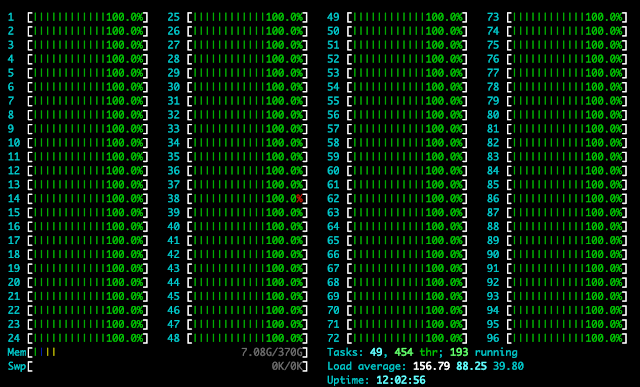
There are few things more satisfying programming than firing up htop on a high core count machine and watching cpu usage light up.


Or, even better, fix that performance problem and watch the cores quiet down... :)


I paid for the whole CPU, I'm going to use it all. (when compile something obviusly)


Last year I ran some simulations that maxed out a 48 core machine. That was a sight to see :D


I bet it was also a sound to hear, and some heat to feel as well!


I can’t express how many times htop has made my life easy by giving me this nice interactive UX. There is a reason it’s part of every docker image I create.


> There is a reason it’s part of every docker image I create.

You really shouldn't put troubleshooting tools in your container images. You can join a "toolbox" container to a running container's namespace to get your tools there when you need them. That avoids unnecessarily large images, extra build time, and extra dependencies in your image.


sorry for being ignorant to learn myself, but how do I do this?


No need to apologize, this stuff isn't always easy to find. In docker, it's done by passing --pid=container:$TARGETCONTAINER to docker run

Here's the docs on it: https://docs.docker.com/engine/reference/run/#pid-settings--...


htop is a really awesome tool, lots of hidden goodies in it. Thankful for the people that stepped up to maintain this in a kind way without being rude to the original maintainer and creator.


Good to see that the original maintainer is on board with this and package maintainers for the distros are changing to the new release.

Today I noticed that Arch is already on this release. Albeit with this[0] patch applied.

[0]: https://github.com/htop-dev/htop/issues/15


https://oldd.it/r/linux/comments/iiowpn/htop_forked_to_htopd...

I've created this domain (and olddit.com/path) to redirect the urlpath to old.reddit.com using only a single CloudFlare Page Rule.


What's the benefit of that over just using old.reddit.com?


It works with reddit's shortened links:

https://redd.it/iiowpn -> new interface

https://oldd.it/iiowpn -> old interface

On mobile you can save some keystrokes too, since the new FireFox does not support many extensions, yet.


Using the old Reddit site as the default: https://www.reddit.com/r/help/comments/8f2n7d/how_do_i_perma...


I don't have a reddit account and I have no interest in creating one.


I don't know if things have changed, but preferences settings weren't enough, reddit would randomly switch to the new theme. After that I changed all my bookmarks to old reddit.


> Not available on Firefox for Android. You can use this add-on with Firefox for Desktop. Learn more about add-ons for Android.


You can use a browser extension to always load old reddit.


Unless you're on mobile


Unless you’re on Firefox? Edit: nvm, on GNU/Linux mobile you can use FF or Chromium (or GNOME Web or lynx or netsurf or…)


Not on the whitelist of extensions for the current Firefox version. You'll need to build your own.


Yep. The most infuriating part of their sudden disabling of existing extensions and preventing users from installing non-whitelisted ones on mobile FF is that if extensions like uBlock Origin and NoScript will work you know that a simple redirector extension would too.


<strikethrough> “Simple redirector extension” sounds like a good generic tool that should exist to sed urls in a similar way to how ublockO & AdNauseum can block more than one type of content based on simple rules. One extension could use one rule to use the old version of Reddit, another to replace YouTube with Invidious, Twitter with Nitter… oh wait! </strikethrough>

I knew https://addons.mozilla.org/en-US/firefox/addon/privacy-redir... could do the last two plus something for Instagram, searched https://duckduckgo.com/?q=nitter+invidious+instagram and lo and behold, https://www.oldd.it/r/privacy/comments/hpy82f/redirect_twitt....

I’d be surprised if HTTPS Everywhere wasn’t whitelisted. And if it isn’t, TIL you can use it to fix Reddit.


Oddly, while Firefox nightly did disable my extensions after the update, Firefox stable has continued to leave them enabled. They're not working perfectly, but they're all enabled. xStyle, tampermonkey, etc are all working for me. The only problem is that they're now impossible to disable, because that entire UI no longer exists (I've got some extensions that do unconditional page modification, which I had to uninstall completely)


Is there a changelog? Because I can't find what's new in this release on the site or in the repository (without reading the git commit messages)


The posted link is the change log?

https://github.com/htop-dev/htop/blob/master/ChangeLog

Perhaps it originally linked to their site, which is:

https://htop.dev/


There is a changelog in the Downloads page: https://htop.dev/downloads.html


How does it handle many CPUs? In 2.2 it has a line for each CPU, as that number grows it will take over the screen.


If you press "S", you will get a layout editor where you can change the CPUs from 2 per line to 4 per line. The exact options you're looking for are "CPUs (1&2/4): first half in 2 shorter columns" and "CPUs (3&4/4): second half in 2 shorter columns".


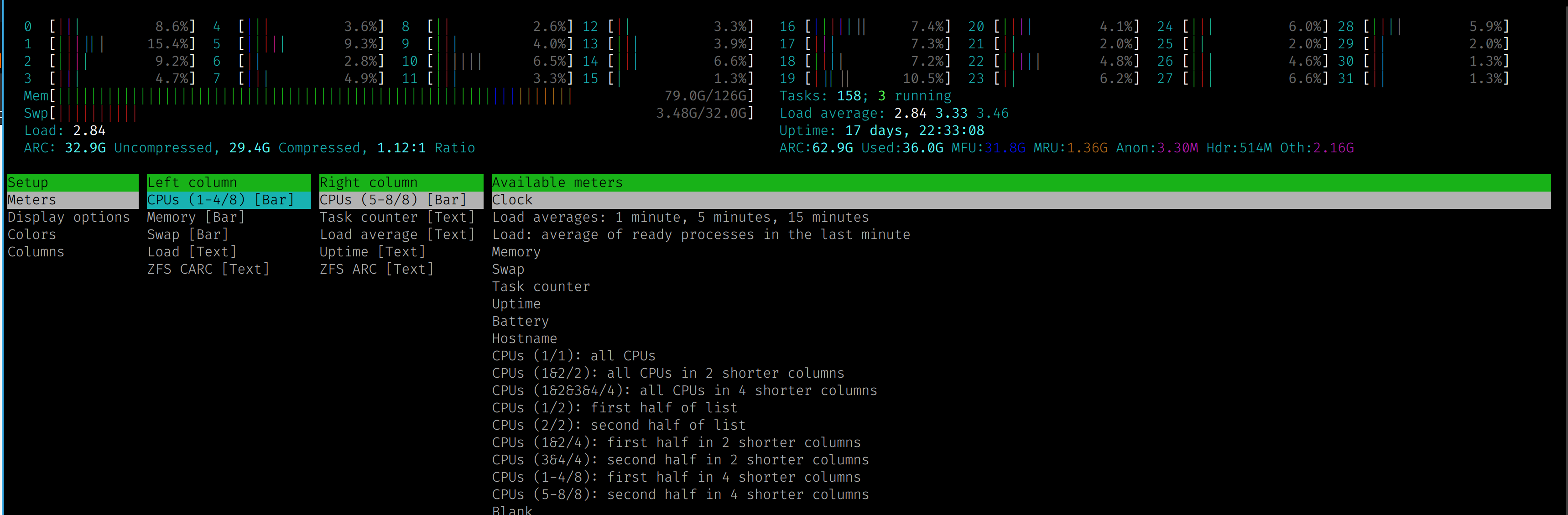
This is actually configurable. Hit F2 and go into setup and you can change the configuration of what's displayed up top.

Here's a screenshot of my server with 32threads/cpus. https://www.simcop2387.info/htop3.png

This is i configured with 8 cpus per line


One of the first packages I install


Man have I been hanging out for this. 2.x was sorely lacking in so many ways.


htop is by far the most important linux utility


does this work on mac now?


now all that's missing is multisystem support


you mean it should show cpu/process statuses inside of virtual machines like Xenserver tools?


across multiple VMs, physical machines, whatever. Host/server mode, data collection, etc, etc


What's that?


Guidelines | FAQ | Lists | API | Security | Legal | Apply to YC | Contact

Search: