Boox e-ink tabs do the same thing, but they're Android underneath so it's not locked down to Amazon and dependent on partnerships with Microsoft to add an export button.
I have a Boox that I'm quite happy with. It's quite pleasant to write on, and the battery lasts a considerable amount of time. The calibration seems to sometimes go off slightly, but I'm still not sure if that is the device's issue, the pen, or myself.
My Boox is about 3 years old now. Most of my reading is done in the Kindle app, and I enjoy the writing experience, but feel there are ways that an Amazon device could provide better integration with note taking in the books I'm reading.
I'm starting to notice the battery on my Boox doesn't last as long as it used to, so I'll probably replace it with a Kindle.
I got the Ratta Heart of Metal Pen to use with my boox, and it's a really nice writing experience, and I don't have to replace tips (I found the boox tip didn't last very long). Just added a screen protector and it's been great.
https://supernote.com/products/heart-of-metal-pen
Boox A4 is great (Max Lumi 2), extremely practical. Can't go back to smaller e-inks. Kindle almost needed lens to read anything and I can't imagine writing on it.
I can only speak to the reMarkable. I like it, but it's definitely a note taking device that also has some basic support for reading documents. As an e-reader it's not anywhere close to a Kindle.
Kobo is also an e-reader company like Amazon and so their ePub support is fantastic. Boox's is OK but since it's Android you can literally use any ebook app you want including Kobo and Kindle so it's not a huge deal. The PDF reader on Boox devices is very good too with features like autocroping of margins.
Remarkable 2 doesn't have a backlight. Kobo's software is fine (mostly), but the design or manufacturing seems to be a notch below. On my Kobo the touchscreen is enragingly inaccurate.
And, direct access to the Amazon library is not an insignificant advantage.
What do you mean by the kobo screen being inaccurate? Is this for the stylus of the touch itself? I was considering buying a kobo but this comment scares me a bit now.
I've been using an Elipsa for about a year with a Renaisser stylus - have not noticed any inaccuracy but the writing can sometimes be laggy. I really like it, all in all though - all of my work notes tend to be on it.
I love the Onyx as it runs full Android. Also its built in apps and ink settings have a slightly steep learning curve and what seem like weird UI decisions at first, but turn out to give a lot of control over the experience.
I used my reMarkable 2 tablet all throughout university (I only recently graduated). Searchability is an area that e-ink tablets can surely solve, although the reMarkable's software wasn't particularly helpful in this regard (perhaps it has improved now). You can only convert 1 page at a time using their OCR and they only recently added the ability to tag documents.
My favorite feature was actually simple: I don't have to erase everything to rearrange the layout of my notes. Being able to simply select a portion of the page, resize, and move it was killer. Another great feature is simply not having to lug separate notebooks around. The ability to organize and sort documents was very helpful.
I've heard Microsoft Surface pens are compatible with the Kobo Sage and Elipsa.
Why did you pick a "Renaisser" over the standard Kobo stylus?
I've got a Sage myself and have toyed with getting a stylus, so if you can offer a compelling recommendation over the official stylus, that would save me fifteen bucks.
The Renaisser that I picked, the 520C, was Microsoft Surface compatible. It has two advantages: built-in usb-c charge port (vs. the weird "aaaa" batteries the stock and others take), and a felt-like stylus that felt way less slippery compared to the stock stylus. Edit0: also, unlike the stock Kobo stylus, the nib seems much less prone to wear - the former wore down in about a month while the latter is still going fine months later.
I'm confident that Amazon will get sync working long before the PineNote becomes a daily driver for most folks. I love fiddling with my PineTime, but the key word is "fiddling", and I don't see that the PineNote is any further along than the watch is.
I guess it is time for me to upgrade my Kindle Oasis (1st gen I assume), which I never use to this Kindle Scribe, which I also probably never going to use.
But the main issue with the Kindles was not being able to read PDF (technical books, technical articles), and I dreamed about the DX when it was available only in US, and I also did not have money to buy one. After I moved to US 13 years ago, the DX version was out of shelves. So, pretty excited to give Scribe a try!
I have never once wanted to read a PDF on my Kindle and I'm not entirely sure why anyone would. Mostly because reading PDFs on something like kindle would be a shit show (I assume this is entirely why they haven't added that functionality).
I've owned probably 10+ kindles, including the DX, and I think its honestly the bit of technology I used _the most_ outside of my iPhone.
Just to give you some context as a counterexample, I often need to read 10-50 pages of dense, size 10, double column scientific PDFs with many graphs and figures. These documents, which are typically either A4 or letter size, look abysmal at nearly any scale <90%. Color is also regularly required to parse many graphs properly.
I use my Kindle exclusively for reading documents which are primarily lightly-formatted text (e.g. novels, textbooks, etc) but it's atrocious for PDFs. When needed, I switch to an iPad Pro that I use exclusively for reading (and annotating) these PDFs, which is likewise horrible for reading "regular" text.
I have a pristine, barely used DX with cover (Kindle DX Graphite?), maybe I should throw it on eBay? There are already a couple of listings if you're so inclined.
I ended up grabbing a used Oasis, since my primary use case of reading papers has declined outside of grad school (and all of today's papers assume you have color printing). At this point I think I'm just going to use it for reading books.
What do you mean by "they haven't added that functionality"? Kindles will readily open PDF files, and DX in particular was great for that on most documents, as the screen size large enough to fit one page at readable zoom level made scrolling unnecessary.
I've owned at least six or seven. They wear out (I think only the first gen and DX had a replaceable battery), get broken, get lost. They are superseded by better models (front lighting on the Paperwhite was a game-changer).
This will replace my DXG, which is just too slow now.
I already have the Gen 11 Paperwhite (SE), and I'm blown away by the upgraded display quality even from the Gen 10. The warm colour is for me a night and day upgrade for, sorry, night time reading - also, the extra size really helps as well.
In addition to reading technical books (which is possible on the Gen 11 PW - much easier than on the 10) I really like the idea of being able to organise my thoughts in a more distraction free environment. 300ppi at that size will be pretty sensational.
I bought a DX so that I could read PDFs and whatnot. It went unused; it was VERY slow and most papers still required (slowwww) scrolling when viewed at a readable scale.
Did the Oasis really not have that functionality? I have a Kindle Touch (2011) and read PDFs on it all the time. Depending on the text size, it's usually more comfortable to read them a half-page at a time in landscape mode, but if the margins are cropped a full page view is often perfectly readable.
Everyone thinks they want to read a PDF on something that isn't a desktop or an A4 sheet of paper, and then they try it and realize that there are basically no PDFs that are laid-out in a way that could be feasibly consumed on such a device.
In addition to that, writing heuristics to try and make it possible to unify the experience of reading any arbitrary PDF is such a quagmire/shitshow that basically no one is willing to step up and try to make it possible.
Automatic text reflow for PDFs on e-readers have worked just fine as far back as the Sony PRS-500 from the late '00s. It wasn't anything resembling fast but it was adequate.
The Kindle is perfectly capable of letting you view PDFs. Many humans are not perfectly capable of reading material laid out for a letter/A4 sized sheet of paper on a six-inch screen. Yes, there are ways around it, but not everyone finds them satisfactory.
You can, but it's a very unpleasant experience on the Kindle's small screen. The DX was much better at this because it could comfortably display a full page of a PDF without needing to scroll
I wish someone would make a tablet w/ a transflective display to replace my Fujitsu Stylistic ST-4110 --- currently rocking a Samsung Galaxy Book 12, but I've had to roll back to Windows build 1703 twice now, and it's simply not usable in bright, direct sunlight.
Pre-ordered a Kindle Scribe, so I'll have 3 devices w/ Wacom styluses (also a Galaxy Note 10+ and the afore-mentioned Galaxy Book 12), one of which will work in direct sunlight.
Surprised that there wasn't any mention of the availability of maps for the Kindle Scribe.
While I'd like to see nifty features such as:
- use as a second display
- use as a graphics tablet (while being used as a second display)
so long as it works as:
- an ebook reader
- one can take notes
- one can write out documents and transfer them (and notes) to a desktop (w/ or w/o handwriting recognition, hopefully w/)
I should be fine.
That said, I'd like to see Nebo.app or some equivalent for the Kindle Scribe.
How long do you think is it until high refresh rate, color e-ink displays become a thing? What is a "high" refresh rate when it comes to e-ink? I'm very curious about this technology, but haven't looked into it much.
I think it's in the order of magnitude of ~5 years until the refresh rate is good enough.
I meant high refresh rate in context of eink screens today. I want a refresh rate nearly as good as a normal monitor (~120) but I'd be happy ~100 too. EInk seems to be anywhere from 15-70 (hard to pin this down) so still some work is needed.
I have a Remarkable 2 and a Boox Note Air (the first one), so I’m definitely going to get the Scribe. I love my Oasis but this will really seal things.
I love my Boox so much. And the Remarkable has a lot of potential and is a beautifully designed device. But if anyone is going to be able to make this category more mainstream, it is Amazon. Also looking forward to the hacks that will come to it if there are enough users.
The Oasis, with page-turn buttons, hasn't been refreshed since mid-2019; the latest Paperwhite, with USB-C port, was released two years later. I expect the next Oasis will have USB-C.
I was really hoping for a new Oasis in this announcement! I currently use a Voyage, a long-since-discontinued Kindle that was a hybrid of the Paperwhite and the Oasis, with a symmetric design and haptic page turn "buttons" on the left and right bezels.
With the arrival of the Paperwhite Signature Edition I'm wondering if Amazon is going to phase out the Oasis line entirely, just as they did with Voyage. It can't be selling that well as virtually every feature is now as good or better on the Paperwhite line.
Thanks for mentioning this - I've been waiting many many years to upgrade my kindle until they released one with USB C. I didn't know they had one out now
The Kindle Paperwhite uses a USB-C connector. (It probably still uses USB 2.x for data transfer, though -- I'm not sure why that would matter to anyone).
I believe only the Kindle Oasis has physical page-turning buttons, and it (inexplicably) still uses Micro-USB. I suspect this situation is what the parent is referring to.
Is that really a big deal? Micro USB is a perfectly cromulent technology and cords cost a fraction of their usbc counterparts (plus everybody has a million of them)
Its not a huge deal, but I certainly strongly prefer to have USB C nowadays. I travel a lot and having a single type of cable is a real convenience. I tend to take an octopus cable (with type C, Micro and lighting) to fill the gaps, but when laptop, headphones, phone, tablet, power bank, gps; all use one type and Kindle uses another...
Suffice it to say I'm looking forward to the time when USB C is ubiquitous, even though it has some short comings.
I wouldn't buy another Kindle just for USB C though.
The main reason I stick with Amazon is that it has the best integration with my local library, which is where I get 90% of my books. Like most libraries, they are OverDrive based.
I can check out a book from the library on my phone and have it appear wirelessly on my Kindle moments later. Last I checked all non-Kindle devices require you to basically download an .epub file onto your computer and then sideload it with a cable to check out a library book, which is too much hassle for something I do several times a week.
I hope this puts remarkable in their place after gibbing their loyal early adopters with a subscription model. I am aware they’ve reverted it but at this point I have no sympathy for them.
I hope the price of the Scribe actually includes the stylus unlike ReMarkable. It seems pretty sleazy that you big an e-ink tablet that needs a stylus and it isn’t included in the price.
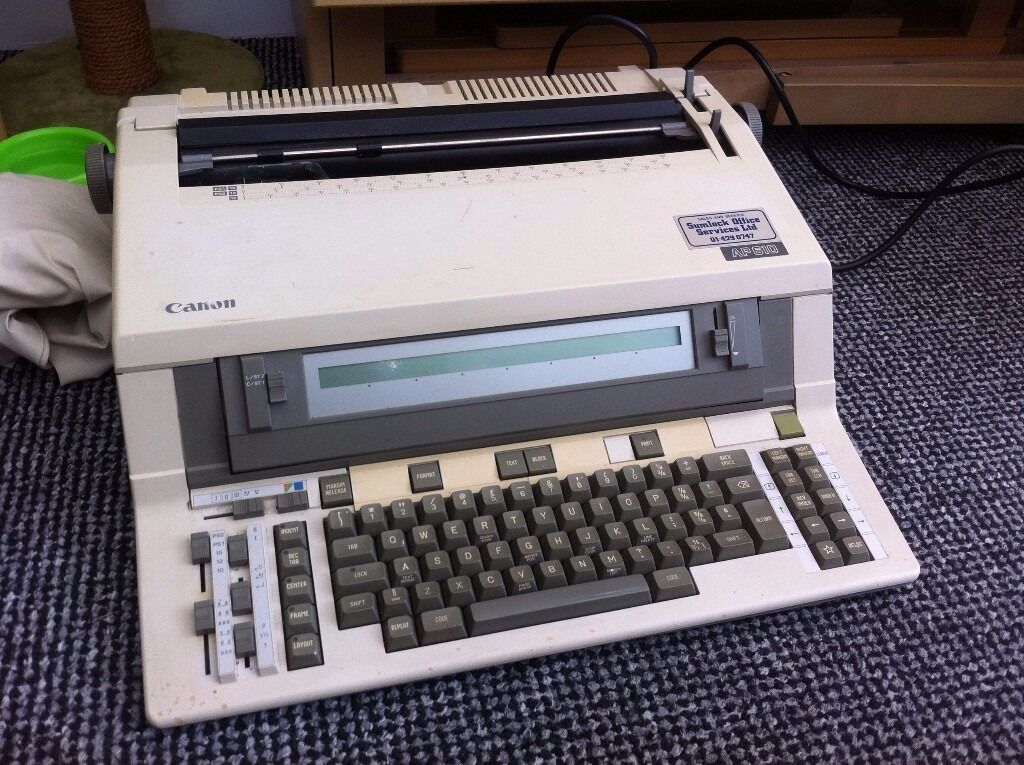
This made it occur to me that a tablet that mimics the form of electric typewriters—a fixed-width LCD screen, a bit akin to those on simple calculators, with the full page above it, and text from the LCD appended to the "page" when you move to the next line—might actually be awesome for writing, coupled with an external keyboard. Potentially-very-low input latency while typing, and no page-flickering except when changing lines. You could even scroll back to edit.
Right—that, but stick a big e-ink display above it. USB port and bluetooth so you can use an external keyboard (though a compact attached keyboard/stand isn't a bad idea, even if it's kinda a shitty keyboard).
Like this, but instead of printing your finished line to paper it "prints" to e-ink:
(I personally wouldn't touch one -- I need multiple lines of text in order to frame my thoughts in context, never mind that I like being able to dive online to do impromptu research as I write -- but I can see it appealing to some folks. 100 hour battery life is the obvious draw.)
Exactly this. About 7 years ago I bought a secondhand Alphasmart and started using it. I loved it for what it was but I had to stop using it because I could not see enough of what I had written.
I’m now using a Pi with a monitor in portrait mode and FocusWriter to write. It is a fantastic single purpose writing device. But I would pay money for something similar with reasonable screen real estate I could stick in a bag.
Now that I think about it, it’s a little surprising there hasn’t been a first party keyboard attachment for Kindles, Kobos, or the reMarkable tablet yet. Maybe the reMarkable at least supports keyboards via bluetooth. There’s many of us who would rather have the kb instead of the stylus. Or with the kb as main input with the stylus supplementary.
Sort of, but with a one-line old-school monochrome text LCD. You type and edit your line there for near-instant input latency, and the e-ink screen only refreshes when you change lines. It's how that kind of electric typewriter worked, except instead of e-ink it printed to paper when you finished a line.
Ironic that the original Kindle was already e-ink and had more features, like hardware page-turning buttons and "free for life" (yes I know) cellular connectivity.
Yes, though that original Kindle was an ergonomic nightmare in other ways. It was difficult to hold without triggering those buttons because they were right on the edge of the device. The silver scroll thingy was kind of fun until it stopped working and then the device was toast. The asymmetric wedge shape was a cute reference to some kind of notebook but didn’t work well in the hand.
I went through a succession of Kindles and the recent ones have not buttons but I find that I don’t really miss them. A simple tap of my thumb on the nearest edge of the screen works just as well.
I am displeased by Amazon removing the cellular connectivity, and was always willing to pay the premium to get it on new devices. Of course, on the Kindle 1 (which had page-turn buttons and a removable battery) 3G was the only means of connectivity (along with USB, if I remember correctly); wifi didn't come until later.
How I hope it works is that the "PDF mark-up" can be exported as a PDF. This would allow me to insert papers/reports, comment on them and then send them back to students. What I can't do is upload these documents to the cloud - so I hope this is addressed.
In terms of cost, I was hoping for something maybe $200. At $400 it's getting close to a relatively good tablet or even a usable laptop.
The design is reminiscent of the Kindle Oasis which is IPX8, their other premium offering is the Paperwhite which is also IPX8. The Scribe costs more and isn't water proof. I can't imagine what about the digitzer makes it unable to be waterproof, unless Amazon just thought it wasn't worth it.
I will wait for 2-3rd generation before buying it. I bought kindle early at $400 before it became a brick and I can just use my tablet/phone anyways. Remarkable has failed me twice. I am on fence with e Ink tablets. Perhaps it’s not for me.
Both the Remarkable and the Scribe are only 10" devices. If you are going to read and markup PDFs, a 13" screen makes so much more sense because it's very close to letter/A4 size.
I’ve had one for many years and found it to be the perfect device to read and take notes on PDFs: 13” screen, super lightweight, easy to send PDFs to it and from it through the app and writing on it feels similar to writing on paper. Unfortunately the pen’s tip broke off and there doesn’t seem to be any way to fix it or buy new ones. It is mostly useless without it.
Those are replacement tips. I broke the head, leaving the shaft inside the pen and thats what I'm not able to get out. It seems to be a common problem if you look at the reviews:
The retail channel is probably constrained as this seems mostly marketed toward businesses which might purchase along with a support contract. The retail market for these devices seems strictly supplementary to the main market (at least for Japanese brands).
Papyr is based on the same hardware as the Quaderno Gen 1. The hardware platform is licensed from a company called Linfiny. It's been rumored for a while that Quirklogic will release a Papyr based on the Gen 2 hardware, but it hasn't materialized yet. The Gen 2 hardware is worth it if you're doing a lot of handwriting because the Wacom digitizer is way, way better, but Papyr does have some additional software that could tip the scales in its direction.
remarkable has very capable software, as such the "microfaiche / pinch-to-zoom" style operation is pretty effective. It can compensate somewhat without too much hassle for reading and annotating double-column works without eye strain.
> I will wait for 2-3rd generation before buying it.
Smart strategy.
I waited for the reMarkable 2 to get better, but it just gotten worse and all it offered was an under powered and non-upgradeable and laughable 8GB of maximum storage + a cloud storage subscription for more storage.
The Kindle Scribe already starts with 16GB and is cheaper than the reMarkable 2 with the equivalent accessories coming with it. I guess the one that can actually deliver a proper e-ink tablet that just works, it would be unsurprisingly Amazon, hence why it is already an immediate best seller.
I'll wait until whoever releases a color E-ink tablet, something that the reMarkable 2 has failed to deliver on, despite some early competitors already selling them but support and features from them isn't going to be as good as Amazon's.
I've been looking into the Boox Nova Air C, which seems like a pretty promising color e-ink tablet, depending on your screen size requirements (7.8"). It runs Android though which may be a good or bad thing depending on one's needs.
I've done fine writing on a lot of tablets, all of which are smaller than A4 (or letter) --- I'd love to see a device that size, but thus far have managed on what has been affordably available.
I love the concept of those e-ink devices, but what kills them for me is the poor contrast (something like 10:1), much worse than writing with a black pen on actual white paper. Due to poor eyesight, e-ink is unusable for me without strong built-in light to boost contrast, and then I might as well use an LCD/OLED tablet with better capabilities.
I have been trying to figure out a better workflow for grabbing websites or PDFs, marking them up, and storing them as notes, either by themselves or in something like Craft or Obsidian to reference later. I'm not sure this really moves the needle as I can't imagine moving stuff to the Kindle and then back again will be frictionless.
I’ve had some luck with Remarkable. Remarkable has a reasonably good experience for getting a PDF to the device, working with it, and then getting it back to the source as a seemingly plain PDF.
I'm curious how the performance / writing experience is relative to the high-end e-ink tablets people are falling in love with these days (remarkable etc.). I don't feel the need to write on my kindle enough to justify it unless it's properly pleasant.
It's ridiculously absurdly convenient. Someone recommends a book to me or I see one mentioned, I quickly Amazon it, one click to send a sample to my Kindle. Amazon has everything, I can't remember when I last couldn't get something there. When I finish a book, I always have a bunch of samples, and Amazon gives you a decent portion of the book, so they're actually useful. If I like a sample, it's two or three taps to buy it and continue reading. I don't know any other store that sells such a wide selection of ebooks in both my native language and English to a EU resident. I'm reading a lot more than I did before my Kindle because I don't have the friction of finding book recommendations in my notes and finding a store and getting the purchased book on the device, and the device is fun too.
De-DRM-ed backups aren't necessarily a bad idea though, I'm with you on that.
Exactly. While de-drm-ing things for backup is nice (although I could just torrent it anyway if that's the case), some people often forget why we use kindle and the it's 'ecosystem'. Great selection on many languages, good device, good apps for mac/windows/android/iphone/ipad, extremely convenient, constant sales on books, etc...
As an aspiring author, I believe in paying for books to support authors. I may also believe that I own the books I've paid for. Take from that what you will...
One necessarily doesn't follow the other - people pay for their ebooks and then dedrm them to no longer be locked into the ebook device vendor's ecosystem.
Amazon and Apple and all their users that like being in that ecosystem would disagree with you.
I was never inconvenienced by being on the Kindle ecosystem, since anything I would like is there, and possibly for a lower price than the rest. Plus, the reader syncs to the cloud, and if I'm stuck waiting somewhere for an appointment, I can just continue reading on my phone.
Using Calibre and de-drm-ing books is way more of an inconvenience. If anything ever happens and Amazon wipes out my library, I would just feel like I could get an already de-drm-ed "backup" from someone else, to the same effect as doing the process myself
It is a matter of perspective, and a very shortsighted one versus a more sustainable one.
Because of that mindset we don't deserve better than the Amazon and Apple of today. And boy are we worse for it, inconvenient doesn't even start to begin to explain it.
Of course it's convenient, the big walled gardens are as successful as they are because they are very convenient as long as you're fairly typical (like the vast majority of people), you don't get kicked out (seems very unlikely) and they don't stop operating (not a big worry with Kindle). Scrounging books from ten different shops, giving my credit card to each, managing everything myself, no sync with my phone, higher prices, not finding some books because they're only on Kindle, that's inconvenient.
Unless you pirate, for most publishers, there's no way to buy books without DRM. If you buy books for Kobo, you are locked on Kobo.
Also, last time I tried, Kobo's phone app was just not good. There was no vertical scroll like Kindle, the animations were not smooth. The online store is also a bit weirder for me to navigate - but that might be just me.
And last, if it was not bought at their online store, it won't have sync between devices, AFAIK
For me the main difference I've found is that ebooks stripped of DRM tend to end up in EPUB form as the presumption is you're ensuring the books remain accessible on future platforms so you're going for an open and 'standard' format.
At which point it's then common to tidy up things like the book metadata (eg correct the genre or add a series identifier). That in turn means the DRM-free EPUB version becomes the better version, so the native and network-free support of side-loading EPUB books on the Kobo etc is a useful thing.
But once you DeDRM in Calibre, it’s literally one click to convert it to ePub. My workflow for removing DRM from all my Kindle books is literally to just use Calibre, the plugins and then convert. It takes the exact amount of time it would take for using a Kobo device.
Side-loading ePub on Kindle is now a thing btw with the personal document system. So you can literally just email files to your Kindle address.
Send to Kindle is a very convenient way to push ebooks to a Kindle device (though it needs network access of course). It's supposed to support EPUB too, unless it already does.
I never had issues side-loading EPUBs to a Kindle with Calibre (the de-facto ebook management application standard), so I don't think that's a problem.
IMO, color eink isn't worth it right now, especially for the difference in price. Unless you really want that faded color newspaper look, it's not appealing at all.
dunno. I think when you present the "drawbacks" of monochrome e-ink, they start to sound like obvious advantages (low power, easy on the eyes, unreal battery life). It can't compare to a color LCD, but it doesn't have to.
Color e-ink makes the drawbacks of an e-ink display much more stark. It begs comparison and loses, badly.